 BookPilot
Calm bookkeeping for first-time business owners
Bookkeeping software for first-time UK business owners. Every record keeps its receipt.
BookPilot is guided bookkeeping software for UK small businesses and sole traders. It gives you clear next steps for invoices, expenses, receipts and bank checks. Run more than one business from the same account, with every feature included.
Founders shape BookPilot
Multiple businesses
Every feature included
No pricing tiers
Automatic updates
FOUNDING ACCESS
One account. Every business. Every feature.
Founding members are not just early customers. You help shape what BookPilot becomes.
One month free. No card needed. Then £16 a month or £180 a year.
Inside BookPilot
See BookPilot in action
Real screens from the Windows app show how BookPilot turns everyday records into clear figures and next steps.
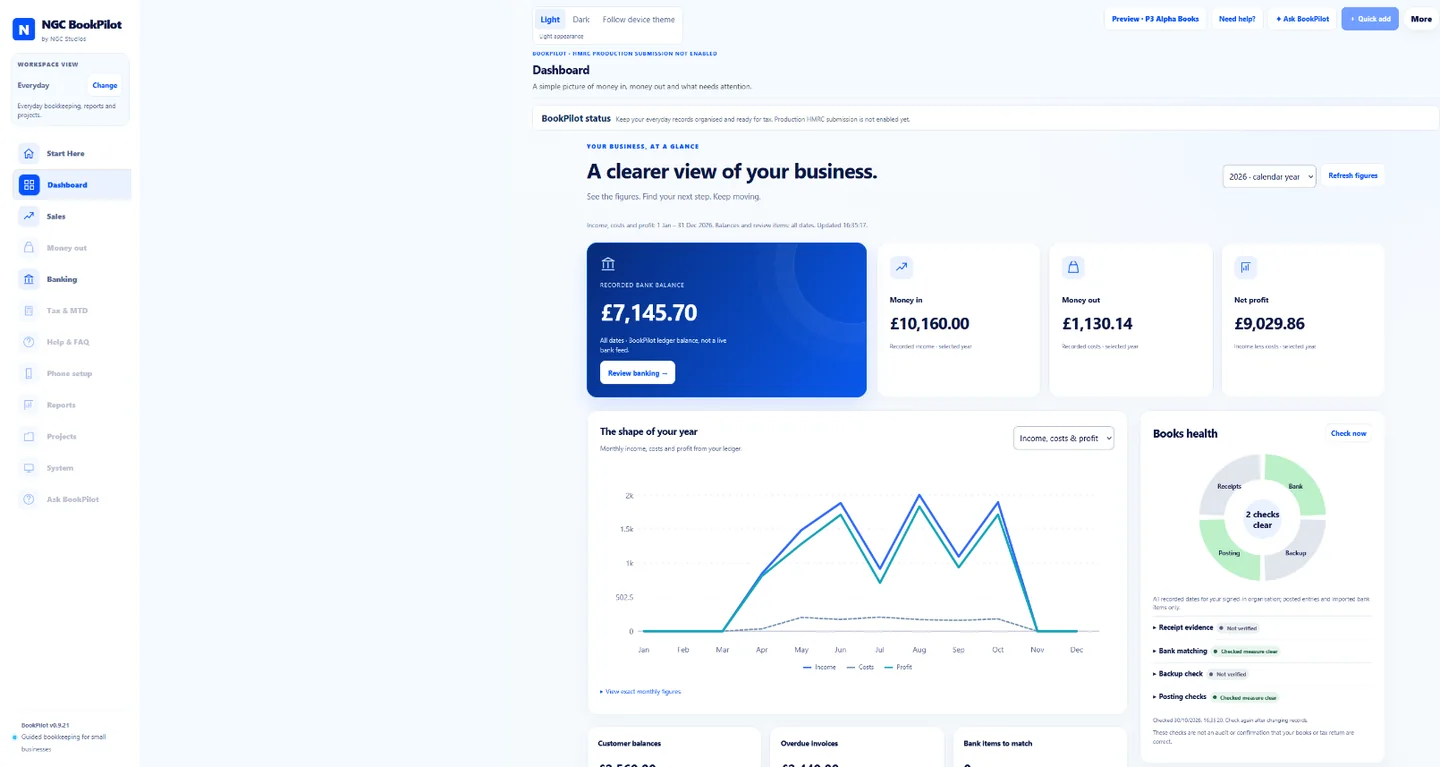
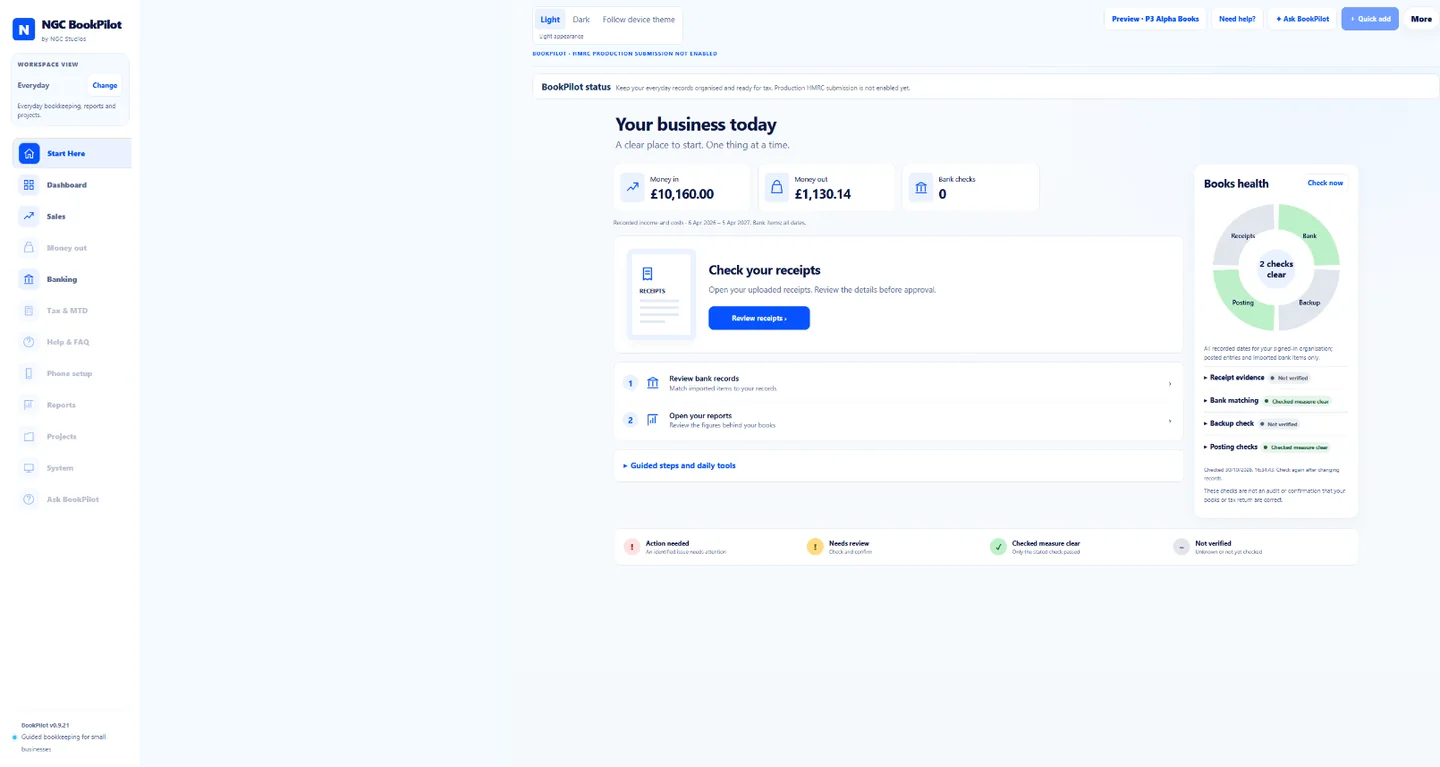
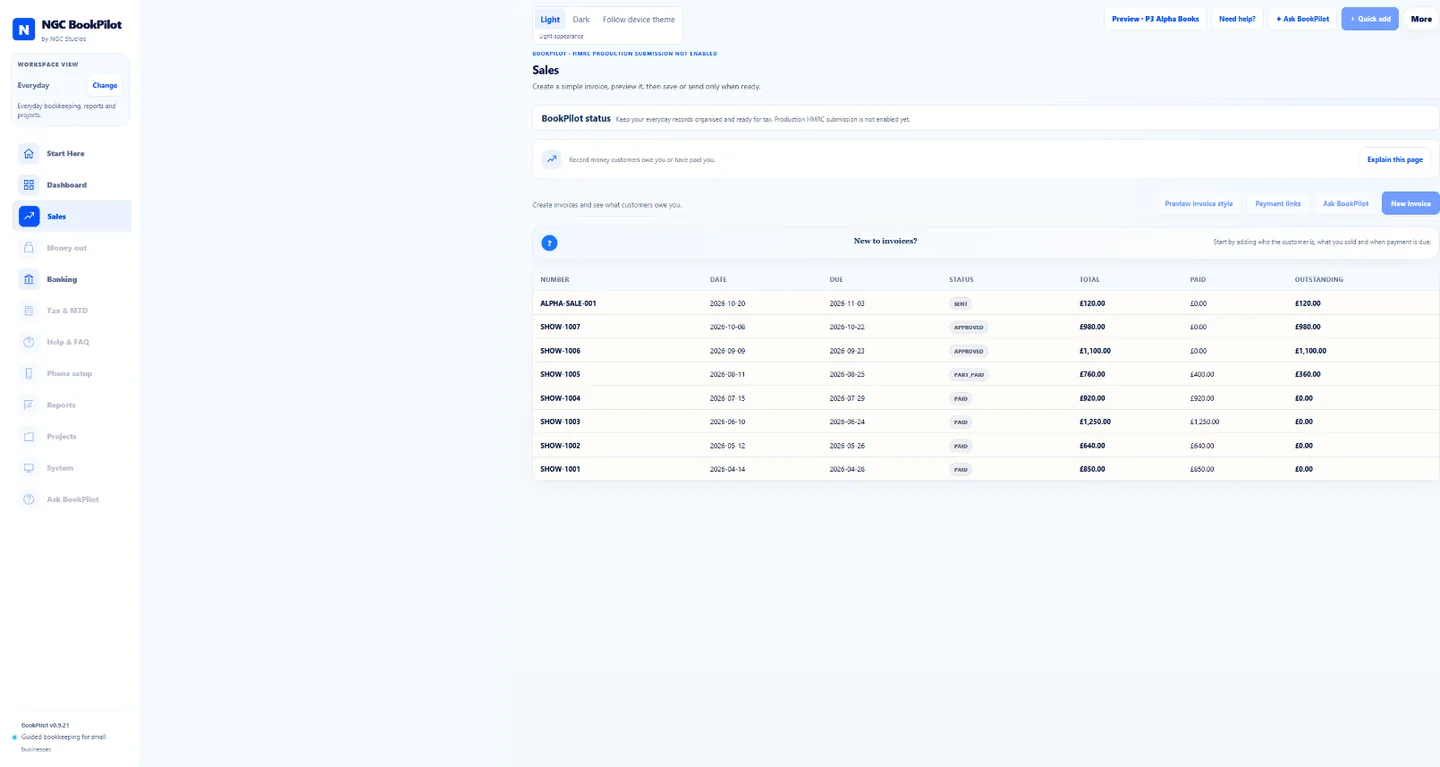
Product screens shown with fictional demonstration data. No customer records are displayed.
How BookPilot works
A simple, guided workflow to keep your business finances organised and tax-ready.
Create invoice
Jones Marketing Ltd
Website design£800.00
Support£120.00
Total£920.00
1
Create invoices
Send professional invoices and track what has been paid, with simple guidance and clear next steps.
RECEIPT
Office supplies
25 Sep 2026
£24.37
Add receipt
Evidence attached
✓ Ready to review
2
Track expenses and receipts
Add expenses and receipts quickly and keep the supporting evidence connected to the record.
Tax review
✓ Records in good shape
Income£28,450
Expenses£9,320
Profit£19,130
3
Stay on top of your tax
Keep records organised and tax-ready with clear summaries showing what is complete and what needs attention.
Making Tax Digital
Ready for Making Tax Digital
Keep digital records with confidence. BookPilot helps you organise your income, expenses, receipts and evidence, so your records stay structured and review-ready.
- Digital record keeping
- Clear tax summaries
- Evidence linked to every entry
- MTD-ready workflow design
BookPilot apps
Start with Windows.
Keep your records together.
Install BookPilot once and it keeps itself up to date when a new version is ready. The Android companion will do the same, while still asking you to confirm before it installs an update. Live filing to HMRC is not available yet.
View download options →Help when you need it
Ask BookPilot. Get a clear answer.
Not sure what a screen means or what to do next? Ask BookPilot explains it in plain English, using the information already in BookPilot to give you a useful next step.
Help in plain English
Ask a question in your own words. BookPilot explains the task step by step without assuming you know bookkeeping terms.
Answers that fit your business
Ask what needs attention, what a figure means or where to find something. BookPilot uses your current screen and records to make the answer useful.
Useful drafts, ready to check
BookPilot can prepare an invoice or expense draft and suggest what to do about a missing receipt. You check it before anything changes.
You stay in control
BookPilot never sends a payment, deletes a record or submits anything for you. Important actions always need your approval.
Evidence linkedOffice supplies receipt
Receipt, review note and business record stay together.
✓ Proof ready for reviewEvidence-first software
Because good tax software keeps the proof, not just the total.
BookPilot is strongest where many simple tools are weakest: receipts, notes, VAT evidence, accountant handover and the explanation behind the number. That gives new users confidence and gives growing businesses stronger records.
Receipt evidence
Review notes
VAT working
Accountant export
Audit history
Secure backups
Available to all
Simple enough for a first business. Serious enough for a growing one.
New users
BookPilot explains what to do next, what each record means and when something needs checking.
Sole traders
Keep income, expenses, receipts and tax tasks under control without spreadsheet stress.
Small businesses
Use invoices, banking, VAT, reports and evidence packs as the business gets busier.
Accountants
Review cleaner records, export packs and evidence trails without chasing every detail.
Why BookPilot
Built for confidence, not accounting fog.
Large accounting suites can be powerful, but new users often need a guided route more than another wall of menus. BookPilot puts the next step, evidence and tax readiness at the centre.
BookPilot is not for everyone. Choose a full accounting suite if you need live HMRC filing today, multi-country accounting or a large app marketplace. BookPilot is for first-time UK owners who want guided records with the proof kept alongside every number.
For new users
Guided screens explain what to do next instead of assuming bookkeeping knowledge.
For evidence
Receipts, notes and review history stay connected to the record behind the number.
For growth
The same flow works for sole traders, small businesses, teams and accountant handover.
For MTD
Digital records, VAT checks and HMRC workflow are treated as product journeys, not hidden admin.
01Invoice and get paidCreate clear invoices and see what has been paid.
02Track expenses with proofKeep each receipt, note and review with the record behind the number.
03Be ready for taxSee what is complete, what needs attention and what is not available yet.
Guided setup, invoices, expenses, bank review, reports, evidence packs, BookPilot Tutor, Ask BookPilot and accountant handover are included. Founding members help shape what comes next, and every new BookPilot feature is included at no extra cost. See the full Founding Access package.
Start today
Bookkeeping that feels calm from the first login.
Create your BookPilot account and keep your books clear from the first invoice to tax-ready records.
Common questions
What is BookPilot?
BookPilot is bookkeeping software for UK sole traders and small business owners with no accounting background. It guides you through invoices, expenses and receipts, and keeps the proof attached to every record.
Who is BookPilot for?
It is for sole traders and small business owners in the UK who want clear, step-by-step bookkeeping without learning accountancy terms.
What does evidence-first mean?
It means every record keeps its receipt and notes with it. Good tax software keeps the proof, not just the total, so you and your accountant can see why each figure is what it is.
How much does BookPilot cost?
Try BookPilot free for one month with no card needed. Founding Access then costs £16 a month or £180 a year for the first 100 paying customers.
Can BookPilot submit to HMRC?
Not today. Live submissions to HMRC are disabled, so BookPilot cannot send anything to HMRC yet. It is built to keep the records that Making Tax Digital expects. Check gov.uk for current rules and dates.
Does BookPilot work with Making Tax Digital?
BookPilot is designed with Making Tax Digital record-keeping in mind. Because live HMRC submissions are disabled, please do not rely on it to meet a filing obligation yet.
What does the AI assistant do?
It prepares drafts and suggestions, such as a proposed entry from a receipt. It never acts without your approval. You review each suggestion and decide.
What devices does BookPilot run on?
BookPilot is available for Windows. An Android companion for quick mobile tasks is planned and will work alongside the Windows app.
Do I need to reinstall BookPilot for updates?
No. Install BookPilot once and it updates itself when a new version is ready.
How is BookPilot different from Xero or QuickBooks?
Full accounting platforms are powerful but can overwhelm first-time users. BookPilot is simpler and more guided, and it is honest about what it does not do yet. It sits between those platforms and a plain spreadsheet.
Read more
Bookkeeping software for sole traders | Making Tax Digital for sole traders | What records a sole trader should keep | How long to keep receipts | BookPilot vs Xero | BookPilot vs QuickBooks | Why BookPilot exists